Click here if you are not able to view this email newsletter correctly.

Banner Image
In this issue
       
Thought Shree-Lipi Seminar
Comments Our new customers
Technical Article Feedback form
Tips & Tricks    
       
Thought

Thinking should become your capital asset, no matter whatever ups and downs you come across in your life.

- Dr. Abdul Kalam

horizontal Rule
Exhibition banner
Technical Article

Email : I have a small query. I am using Shree-Lipi for quite some years for my personal non-commercial use. I am entering some Sanskrit Sookt with Shree-Lipi. I want to put vertical line above letter (a sanskrit symbol to denote pronunciation of the letter). Can you please show me the way as to how it can be put. Please either guide me or direct me to proper contact, who can resolve my query. Regards

Upendra D Thatte, Pune
(Answer sent to Mr. Thatte from our Technical Support Team)

Thanks for contacting Modular Infotech Pvt.Ltd.

Please make sure you have installed Shree-Lipi with Sanskrit Language support from Shree-Lipi 7.3 DVD/ PenCD USB lock. Install Sanskrit language fonts from Modular Font Manager with Shree-Lipi Ex layout. Copy these fonts from C:\SLF70 folder to Windows fonts folder and then restart machine.

If you want to use Sanskrit Sukta in your application like MS Word / CoralDraw select Sanskrit language from Shree-Lipi application window. Then Select Shree-Lipi Ex layout from Setup >> Script Setup. Select Keyboard layout from Setup >> Script Setup.

For more help on accent of Sanskrit Click on Help >> Language Typing Help.

We thank Mr. Thatte for the appreciation email he sent after getting solution from Modular Support Team.

Dear Modular Support Team,

I am very much thankful for your IMMEDIATE / PROMPT response and the VALUABLE support you have given.

Since, last about 15 years, I am using Shree-Lipi, with much comfort and ease, and there was no occasion for me to approach for Support from Modular Infotech.  Earlier version, I had bought in the year 2000 for Windows XP / 97 and present version I bought in 2013 for Windows 2007, since I upgraded my desktop / laptop for the same.

This is the first instance of my requesting Modular Infotech for Support and am very much delighted to experience your prompt and positive support.  I used the solution provided by you and it worked successfully.  Only after this successful implementation of your solution, I am writing this mail.

I am very much thankful to you and looking forward to the same level of promptness and effectiveness in the Support, if any, required in the future.

With Warm Regards,
Upendra D Thatte

Email : Can I use Shree-Lipi Dev Ratna Universal 7.3.06 on Windows 10 Pro

Arun Bhave, Nashik
(Answer from our Technical Support Team)

We have checked the software on Windows 10 on limited editions and it works. We are still testing on different editions as we come across them


horizontal Rule
Cooments

Shree-Lipi Installation in administrator mode

Many times during installation end user has issue of Software Installer giving error “System should be in administrator mode” or “Access denied”. To overcome this issue, you have to have the system in administrator mode. To check whether administrator rights are available, do the following procedure. Note that this is required only for installation of software. After that you may run your system in power user log-in and do your regular work.

How to identify whether User is Administrator or not? There are a number of ways in which you can check this.

Method 1

For windows XP

  • Right Click on “My Computer”
  • Select “Manage”
  • This displays the screen of Computer Management
  • Click on “Local user & Groups” → "User"
  • In the Right Pane you will see list of all users
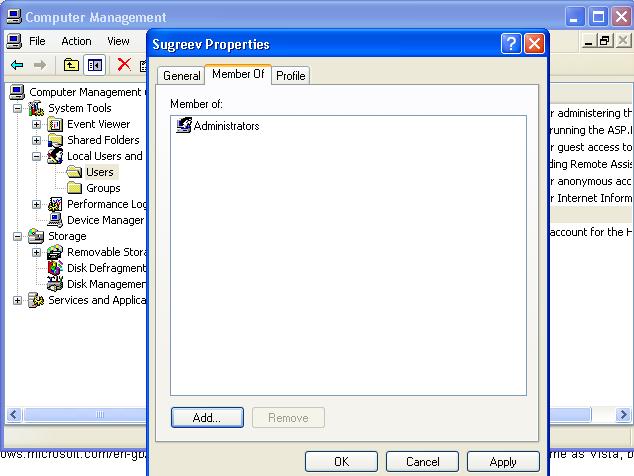
  • Right Click on logged-in user’s name → Select Properties
  • Select “Member of” tab
    You will get information about the user’s group.

Please refer below screenshot for the same.

Error Code 0 image

For windows 7 and Windows 8.1

  • Right Click on “Computer” on the desktop for Windows 7 and “This PC” for Windows 8.1
    Select “Manage”
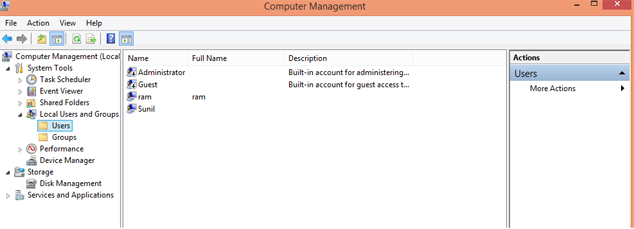
  • This will display the Screen-1 - Computer Management
  • Click on “Local user & Groups” → "Users"
  • In the Right Pane you will see list of users
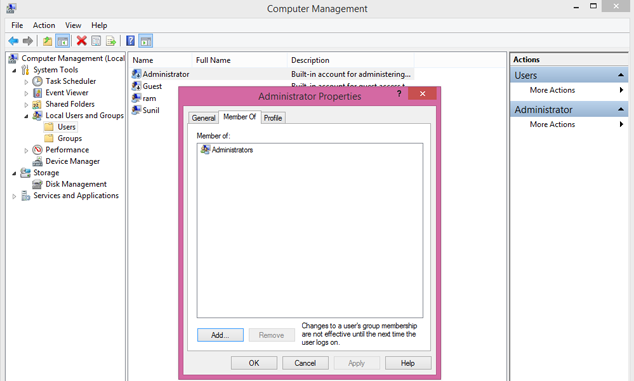
  • Right Click on log-in user name →Select Properties
  • Select “Member of” tab
    You will get information about the user’s group.

Please refer below screen-2 for the same

Error Code 0 image

Screen-1

Error Code 0 image

Screen-2

Method 2

  • Follow the steps given in Method 1 to go to Local User & Groups.
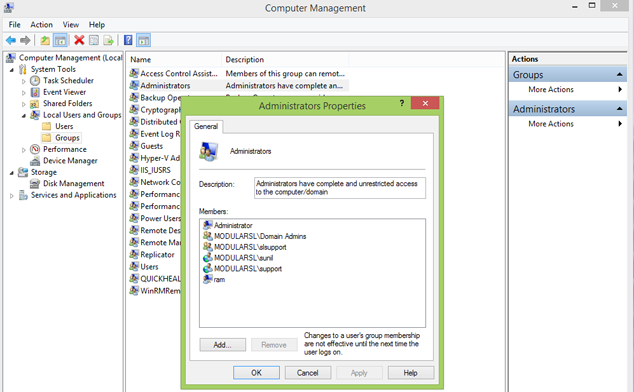
  • Click on Local User & Groups → Groups.
  • Right click on the Administrator Group.
  • You will see all the users having Administrator rights.
    Please refer below screen shot.

Error Code 0 image

Method 3

  • Click on Windows Start button → Click on Run option.
  • Type Regedit.
  • If user is logged-in with Administrator rights then Registry Editor will open. If the user does not have Administrator rights, System will ask for Administrator Password.
horizontal Rule
Tips and Tricks

1) Can Shree-Lipi work on Virtual machine?

No, Shree-Lipi is not supported on virtual machine. It is necessary to have Windows installed on any of the connected Hard Disk.

2) What happens if I have logged in as user login on my operating system?

If you have dongle protected Shree-Lipi software and if the software is already installed in administrator mode then you can work in user login. However, it is not possible to install the software in user login unless the user has administrative rights. User with administrative rights can install the software.

3) Can I use Shree-Lipi software in Windows 10?

We have checked the software on Windows 10 on limited editions and it works. We are still testing on different editions as we come across them.


horizontal Rule

Tips and Tricks

Tips on MS-Windows

1) How to customize the 'Shut down' button in Windows 7?

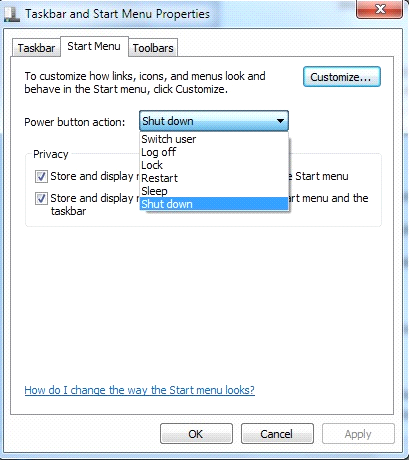
You must have noticed that by default the action of Start menu's 'Shut down' button is to turn off your PC. If you want to use the button for any other action, such as restarting your PC, you click the arrow to the right of the 'Shut down' button and select an action from the drop-down menu.

To change the default action, right-click the Start button and select Properties. On the Start Menu tab, click the "Power button action" drop-down menu and select which action you want to be the default. Then click OK
Error Code 0 image - 2

2) How to open a command prompt at any folder?

Many of the users need to open a particular folder on command prompt. When you are in Windows Explorer, you can open command prompt to any folder. To use it, hold down the Shift key and right-click a folder, and choose "Open command Window here" from the context menu that appears.

3) How to Show all your drives in Windows Explorer?

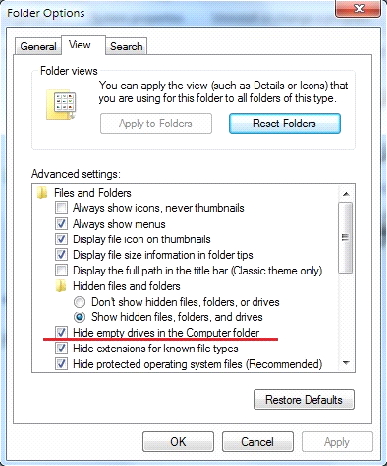
Depending on your system settings, when you go to Computer in Windows Explorer, you may find that you do not see all your drives such as memory card readers, if those drives are empty. If you don't like this, there's a simple way for you to see them even if there is nothing in those:

For Windows XP

  1. Launch Windows Explorer
  2. Select Tools --> Folder Options and click the View tab.
  3. Under "Advanced settings," uncheck the box next to "Hide empty drives in the Computer folder." Click OK. The drives will now always be visible.
For Windows 7

  1. Launch Windows Explorer
  2. Select - Organize menu option.
  3. Select - Folder and search option
  4. Click the View tab.
  5. Under "Advanced settings," uncheck the box next to "Hide empty drives in the Computer folder." Click OK. The drives will now always be visible.

For Windows 8 / 8.1

  1. Open File explorer by right click on start button (Left bottom corner)
  2. Select view menu
  3. Select Option button from Navigation bar.
  4. Under "Advanced settings," uncheck the box next to "Hide empty drives in the Computer folder." Click OK. The drives will now always be visible.

Error Code 0 image - 2

horizontal Rule
New Custoemrs
Error Code 0 image - 2


Above article was published in "Photographerla Gundechappudu" a monthly newspaper means Photographer Heart Beat. Below is a translation of above news article.

(Translation is done by Shree-Lipi Distributors M/s Pallavi Graphics.)

Shree-Lipi came to the rescue of Designers

Photonews, Warangal: It has become a common practice by the official representatives of Anu Script to raid the shops of Video Mixing & Album Designers in the district, seizing their computers & imposing fines. They are insisting these shop owners to buy genuine Anu Script software to get out of the crisis. But, it has become a burden for people who are dependent on designing & mixing job works to purchase AnuScript software due to its high cost.  Though the representatives of newly formed Warangal District Photo & Video Designing Association approached Anu Script company officials recently to discuss the possible remedial measures, their efforts are not productive.  Hence, they approached Shree-Lipi Telugu software company officials and arranged a seminar in Hanamkonda recently. It has been conveyed to them that designers can’t afford huge prices for the software and Shree-Lipi officials responded positively to their request and assured to provide software for affordable price. As a result, more than 180 designers have owned the software. On this occasion, Association president Mr. Sridhar conveyed all the designers that it is always safe to purchase genuine software to avoid monetary loss & legal complications. He suggested the designers to get Shree-Lipi software at the discounted price being offered by Shree-Lipi Company.

horizontal Rule
New Custoemrs
  • Awaz Daily - Dhanabad - Shree-Lipi Dev Ratna
  • Shree Gajanan Maharaj Sansthan - Shegaon - Shree-Lipi Dev Ratna
  • S9 Media - Shirdi - Shree-Lipi Dev Ratna
  • Swayam Shikshan Prayog - Latur - Shree-Lipi Dev Ratna
  • Warangal District Photo & Video Designers Association - Hyderabad - Shree-Lipi Pratham Telugu.
  • SRSG Broadcast (I) Pvt. - Kolkatta - Shree-Lipi Mac (Oriya).
  • Adv. Pandit Deviprasad Sharma - Indore - Shree-Lipi Dev Ratna
  • The Bhaktivedanta Book Trust - Mumbai - Shree-Lipi Dev Ratna + 9 Gold languages
 
horizontal Rule
Feedback Form